Regulated engineering · audit-ready closure
Your ticket says Resolved. Can you prove why?
CADS gives SRE and platform leads an audit-ready closure trail beside Jira and ServiceNow — decisions, evidence, and exceptions in one record. No rip-and-replace.
B2B SaaS for incident closure · Works beside Jira & ServiceNow · Built for teams under SOC 2 / audit scrutiny
Closure Pack from $799See pricing
Jira + Slack + Confluence coordinate work and document after the fact. They do not require a structured why, evidence, and closure bar at Done. CADS sits beside your ITSM and makes closure accountable.
Early stage · B2B SaaS
Evidence first — not a logo wall
Cadslab is early-stage. Our product proves value to regulated engineering teams before we invent social proof. Start with the record you can walk yourself.
One-time software access
The Closure Pack ($799) gives you full product access with guided onboarding to prove value before any subscription.
Works beside Jira & ServiceNow
Tickets stay in your ITSM. CADS holds closure policy, decisions, and the audit-ready trail.
Built for audit pressure
For teams under SOC 2 Type II and DORA scrutiny — buyer context, not a borrowed certification claim.
“Closed should mean you can open one record — not reconstruct a week from Slack.” — Founder, Cadslab
The problem
Teams solve problems — but lose the knowledge of how they solved them.
Your next SOC 2 Type II audit or DORA review will ask for evidence of how incidents were resolved — not just that a ticket moved to Done. A Jira status does not answer that question.
Closure Without a Shared Bar
Tickets resolve in ITSM, but teams disagree on what "done" requires — and leadership has no single standard to trust.
Decisions Not Recorded
What was chosen and why is never captured in any durable form.
Reasoning Disappears
The thinking behind conclusions is lost as soon as the incident closes.
Before / after
Same incident. Different residue.
Your stack still runs the night. CADS decides what survives the morning.
INC-4821 · Login latency increased: 800ms → 4s
Friday 02:14 · closed Sunday as Resolved in Jira
Without CADS
Ticket closed. Proof kept.
Without CADS: Jira, Slack, Confluence, and email scatter — the reason is lost. With CADS: those fragments converge into one closure record for INC-4821.
Jira + Slack + Confluence coordinate work and document after the fact. They do not require a structured why, evidence, and closure bar at Done. CADS sits beside your ITSM and makes closure accountable.
Product demo
Watch a closure become explainable
Three minutes beside your ITSM — then walk the same story yourself.
Workflow
From alert to audit-ready — without leaving your stack
CADS fits into the moment the decision is made — not three days later when the postmortem doc is already half-empty.
Alert or ticket in ITSM
PagerDuty, Jira, or ServiceNow stays the operational home — CADS does not replace it.
Coordinate in chat
Slack or Teams still run the night. The difference is what gets captured next.
Decision + evidence in CADS
Record what was chosen, why, what was rejected, and link the proof while it is fresh.
Closure check
Workspace Guardrail guides or Enforced blocks until expectations are met — or an exception is documented.
Audit-readable trail
Leadership and auditors open one record: readiness, decisions, evidence, and deliberate exceptions.
The record
Everything an auditor needs — in one place
Not a metaphor — the fields your team gets on every closed case.
- Decision
- Reasoning
- Alternatives rejected
- Approver / exception
- Evidence links
- Linked tickets
- Follow-up actions
- Ownership
- Timestamps
- Closure readiness
Product
Every decision has a history
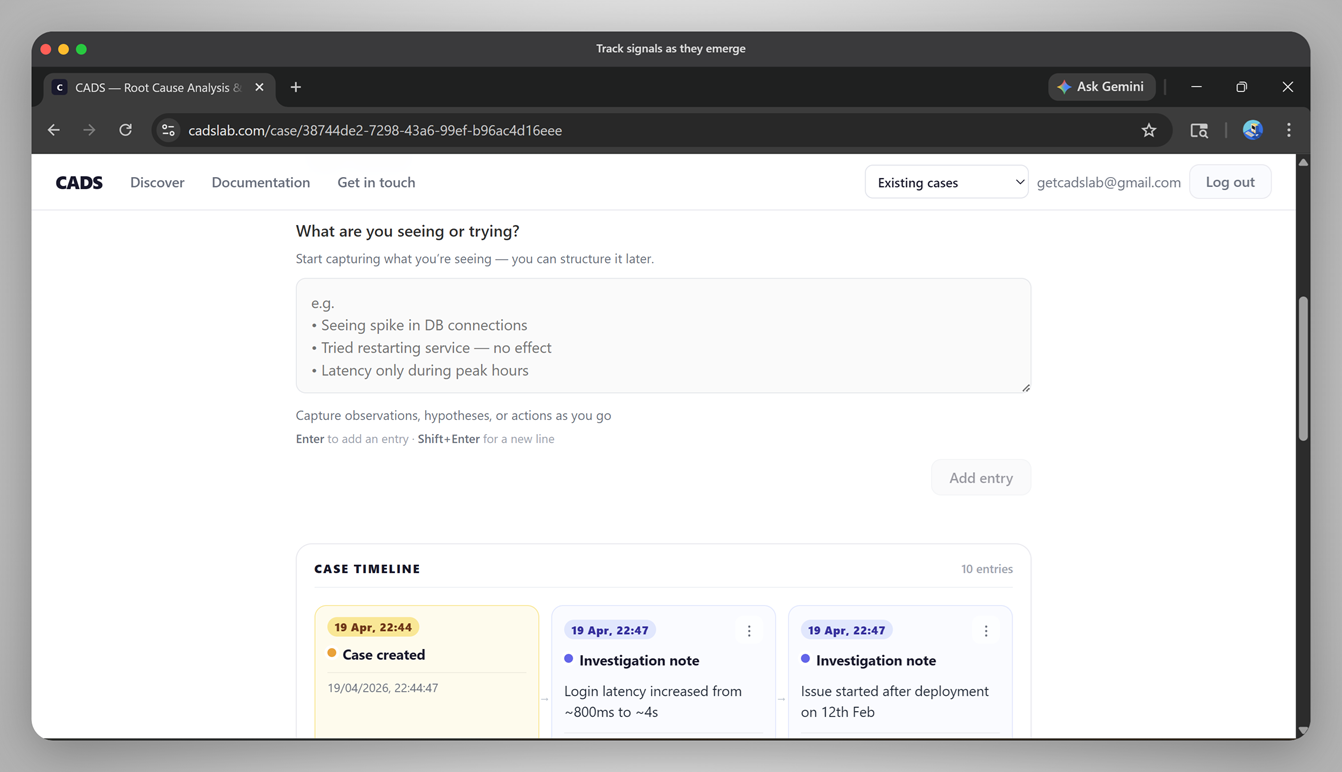
Root cause, corrective actions, and closures stay on one case — so next on-call does not reconstruct the night from scratch.
- One case holds root cause, corrective actions, and closures.
- The case timeline shows what changed and when.
Decisions
Every closure becomes explainable
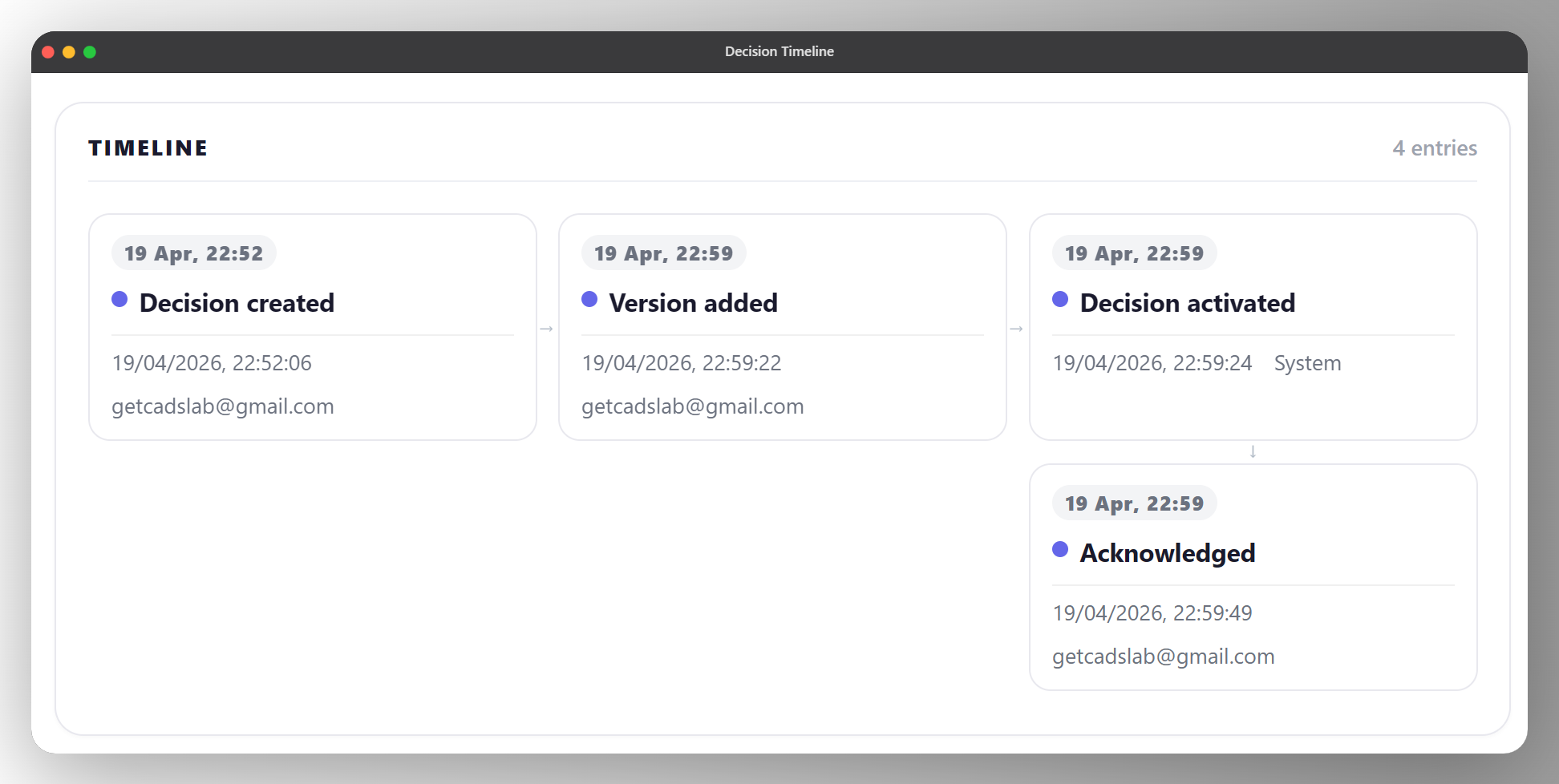
Versions, reviews, and evidence stay attached to the decision — so you can show how understanding evolved, not just that a ticket closed.
- Each decision has its own timeline: versions, reviews, evaluations, events.
- History makes it obvious how understanding evolved — and why you acted.
Turn insight into corrective action.
Workspace
One closure bar the whole org can trust
Workspace is where engineering leads set the closure standard for the whole organization — what every incident must include before it counts as done, who can approve exceptions, and what the audit trail looks like when someone closes outside the checklist.
Shared standards
One bar for when work counts as finished — not five interpretations across tools.
Rules separate from triage
Responders stay fast. Leads set completion policy and review the closure log in Workspace.
Built for oversight
A readable trail when someone closes outside the checklist — without burying teams in paperwork.
Differentiators
What tickets never capture
Real-Time Capture
Records decisions as they happen — not in a retrospective days later.
Decision-First
Structured around reasoning, not tickets or incident numbers.
Evidence-Backed
Every conclusion is tied to supporting data and artefacts.
Append-Only
Once a decision is recorded, it cannot be edited or deleted. If your auditor asks what you knew and when, the record says exactly that — and no one can change it after the fact.
Reusable Memory
Past decisions become a reference library for future incidents.
Progressive Enforcement
Guardrail reminds teams what closure requires; Enforced blocks until those expectations are met — pick the posture that fits your maturity.
Outcomes
Outcomes your next review can feel
Enterprise teams buy outcomes — faster audit prep, instant context, and decisions that outlast the incident channel.
Cut audit preparation scramble
Open the closure record instead of reconstructing a week from Slack, Jira comments, and a half-written postmortem.
Recover incident context instantly
Next on-call sees what was tried, rejected, and proven — without a “why did we…?” meeting.
Keep decisions when people leave
Reasoning survives headcount change because it lives on the case, not in someone’s memory.


Built for
If this is your job, this is your product
Self-identify in one glance — CADS is for the people who own closure quality.
Engineering Managers
One closure bar your team can meet — and a record you can defend in the next review.
Platform Teams
Standards that scale across services without turning every incident into a wiki hunt.
SRE Leaders
Keep responders fast in the night — and keep the why when the pager is quiet again.
Regulated Engineering Teams
Audit-ready trails beside Jira and ServiceNow — without replacing the tools you already run.
Questions buyers ask before getting started
What is the Closure Pack?
The Closure Pack ($799, one-time) is digital access to the full CADS product with guided in-product onboarding. You define a closure bar with your SRE or platform lead, process 5–10 real incidents to audit-ready exports, and document your first exception pattern. At the end you decide: keep monthly Guardrail, move to Team Enforced, or stop.
How long does it take to stand CADS up beside Jira or ServiceNow?
Most teams are running live or recent incidents within days of product onboarding. CADS does not replace tickets or require a rip-and-replace migration — it works beside your existing ITSM.
What does CADS cost?
Closure Pack: $799 one-time. Team Guardrail: $299/mo or $2,990/yr. Team Enforced: $10K–$18K/yr by seats. Org: custom. Most teams start with the Pack to prove value before committing to a subscription.
Who needs to be in the room to buy?
Typically one SRE or platform lead who owns closure quality. Compliance can join later for export review — you do not need dual sponsors to start. Day-to-day, a few responders who will run real incidents through CADS.
How does CADS integrate with our ITSM?
CADS is a standalone web app beside your ITSM. Integrations use webhooks and a machine-to-machine closure evaluation API — not an in-ticket plugin. Tickets stay in Jira or ServiceNow; CADS holds closure policy, decisions, and the review trail.
Where does our data live?
CADS stores workspace closure records, decisions, and policy — not a full copy of your ITSM. Data in transit uses TLS; at-rest encryption is provided by our hosting platform. Current region and provider details are shared during onboarding — we do not invent residency claims on the marketing site. See Security for the honest early-stage posture.
What if the Closure Pack does not work for us?
The Pack fee covers the software access — there is no obligation to subscribe afterward. If accountable closure is not the right fit, you keep the exports and documentation.
Is CADS SOC 2 certified?
No. We do not claim certifications we have not earned. CADS is built for teams under SOC 2 Type II and DORA-style scrutiny so they can show closure evidence — that is buyer context, not a Cadslab certification claim. See our Security page for current controls and roadmap.
How many customers does Cadslab have?
Cadslab is early-stage. Start with the no-signup INC-4821 demo on /try to see the product in action, rather than relying on a logo count.
Get started
Prove closure on real incidents — in two weeks
The Closure Pack ($799) gets you audit-ready exports on 5–10 real incidents. Or walk INC-4821 first to see the record.
B2B SaaS for incident closure · Works beside Jira & ServiceNow · Built for teams under SOC 2 / audit scrutiny
Closure Pack from $799